

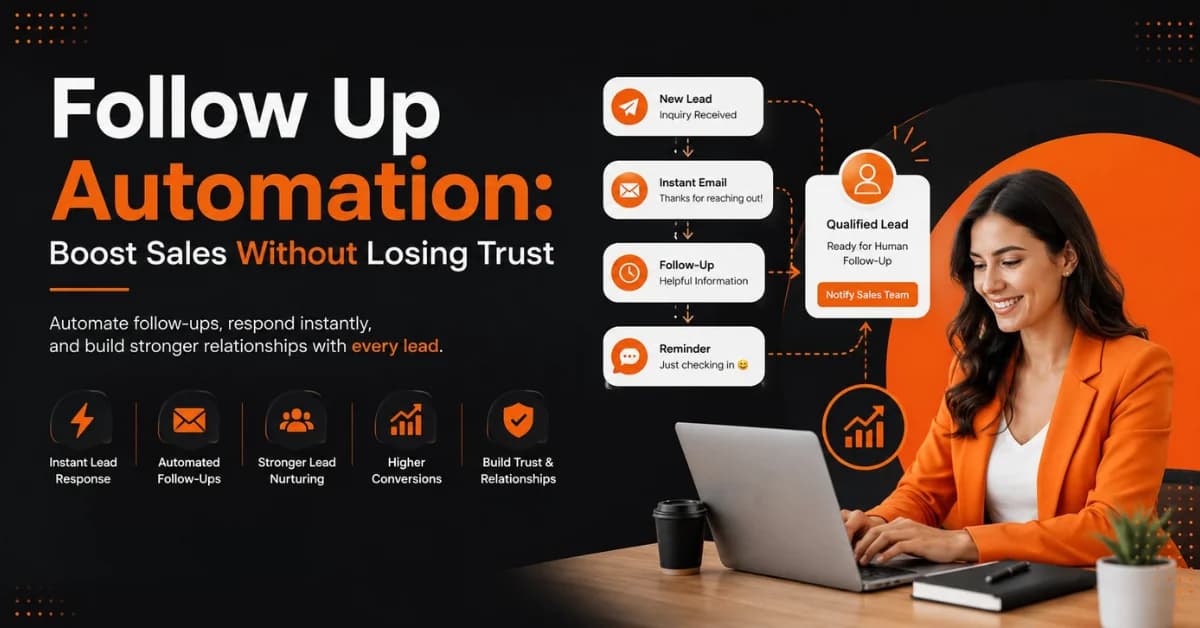
Follow Up Automation: Boost Sales Without Losing Trust
Getting a new lead is only the beginning. The real challenge is staying in touch long enough to help that prospect decide without becoming intrusive. This is where Follow Up Automation can make a meaningful difference. Instead of relying on sales teams to remember every call, email, form submission, and reminder, businesses can use automated workflows to respond consistently and keep leads moving through the sales funnel.
But automation alone does not guarantee better results. Poorly designed sequences can feel robotic, repetitive, or overly promotional. Effective automation should save time while making the customer experience feel more relevant, not less human.
What Is Follow Up Automation?
Follow Up Automation is the use of software and predefined workflows to send or trigger follow-up actions after a prospect interacts with a business.
For example, when someone completes a website form, an automated workflow might:
Record the lead in a CRM.
Send an immediate confirmation.
Assign the lead to a sales representative.
Send useful information based on the service requested.
Remind the sales team to make contact.
Stop the sequence when the prospect replies or becomes a customer.
The goal is not to automate every conversation. Instead, businesses should automate repetitive tasks while keeping important customer interactions human.
A good automated follow-up system makes sure that promising leads do not disappear simply because someone forgot to respond.
Why Instant Lead Response Matters
When someone submits an inquiry, they are usually showing some level of interest. That interest can change quickly. An instant lead response gives the prospect confirmation that their request reached the business. It also establishes what will happen next.
For example:
“Thanks for contacting us. We’ve received your request and a member of our team will review it. We’ll get back to you shortly.”
That simple message can reduce uncertainty without pushing the prospect into a sales conversation.
The important distinction is that fast response does not have to mean aggressive selling.
What an Effective First Response Should Include
A useful first response can:
Thank the prospect for contacting you
Confirm what they requested
Explain the next step
Set a realistic response expectation
Provide a useful resource when appropriate
Offer a simple way to contact a person
Avoid filling the first message with promotions, multiple offers, or unnecessary links.
The first interaction should build confidence rather than pressure the lead.
How to Automate Lead Follow-Up Without Losing Trust
Trust is the biggest consideration when designing an automated workflow. People generally understand that businesses use technology. What they dislike is receiving messages that clearly ignore their needs or previous interactions.
Here are the principles that make Follow Up Automation feel more human.
Personalize the Message
Personalization goes beyond adding a first name.
A useful follow-up should reflect information the prospect has already provided, such as:
Service requested
Product category
Industry
Previous interaction
Stage in the buying journey
Specific question or concern
For example, a lead who requested information about website development should not receive the same follow-up as someone asking about social media management.
Relevant communication feels helpful. Generic communication feels automated.
Set the Right Follow-Up Timing
Not every business needs the same follow-up schedule. For a service business, an immediate message can confirm the inquiry, followed by useful information on Day 1. A Day 3 follow-up can address a common question, while a gentle reminder around Day 5–7 can encourage the prospect to respond. If the lead remains inactive, a later re-engagement message can be sent when appropriate.
Give Leads Something Useful
One of the easiest ways to make follow-up feel less promotional is to provide value.
Instead of repeatedly saying, “Are you ready to buy?”, businesses can share:
A relevant guide
Pricing information
A case study
An FAQ
A product comparison
A checklist
A consultation option
An educational article
Every meaningful follow-up should answer the question:
“Why would this message be useful to the person receiving it?”
Know When to Stop
Automation should have stopping rules.
Stop or change the sequence when:
The prospect replies
The prospect becomes a customer
A salesperson takes over
The prospect asks not to be contacted
The lead is clearly unqualified
The sequence has reached its reasonable endpoint
Continuing to send automated messages after a prospect has already responded is one of the fastest ways to make a business appear disconnected.
Add a Human Handoff
Automation works best when it knows its limits. A high-intent lead may need a salesperson to answer questions, discuss pricing, understand requirements, or recommend the right solution.
For example, if a prospect replies:
“We have a specific requirement. Can someone explain which package would work for us?”
The workflow should move from automated communication to human assistance.
Automate repetitive work. Keep relationship-building conversations human.
Build a Trust-Focused Sales Automation Workflow
A successful workflow should connect lead capture, segmentation, communication, and human follow-up.
Step 1: Capture Every Lead
Businesses can collect leads through:
Website forms
Landing pages
Social media campaigns
Advertising
Email inquiries
Consultation forms
Product inquiries
Other connected communication channels
The important part is to send relevant lead information into a central system so the sales team can act on it.
Step 2: Segment Your Leads
Not every lead has the same needs or buying intent.
You can segment prospects according to:
Service requested
Industry
Location
Lead source
Buying stage
Estimated value
Level of engagement
Segmentation allows businesses to create more relevant lead follow workflows instead of sending one sequence to everyone.
Step 3: Create Relevant Follow-Up Sequences
A person requesting a quotation should receive different communication from someone who only downloaded an educational guide.
For example:
Quotation request:
Confirmation → service information → salesperson follow-up → reminder
Educational download:
Resource delivery → helpful article → related resource → optional consultation
This approach connects sales automation with customer intent.
Step 4: Track Lead Activity
A CRM can help teams understand whether a prospect:
Replied to an email
Clicked a relevant link
Requested more information
Booked a meeting
Submitted another form
Moved to another sales stage
The objective is not to monitor people unnecessarily. It is to help sales teams understand where a prospect is in the customer journey and determine the appropriate next action.
Step 5: Trigger Human Follow-Up
Use engagement signals to help sales teams prioritize leads.
For example, a prospect who repeatedly interacts with relevant information and requests a consultation may deserve faster human attention than someone who has not engaged.
This is where CRM follow-up becomes particularly useful.
Examples of Effective Automated Follow-Up Sequences
Different businesses need different workflows. Here are three practical examples.
Example 1: Service Business Lead
Imagine a potential client submits a form asking about digital marketing services.
A simple workflow could be:
Immediately:
“Thanks for your inquiry. We received your request and will review your requirements.”
Day 1: Send a short guide explaining the service and what information the business needs to prepare.
Day 3: Share a relevant case study or educational resource.
Day 5: Offer a consultation or invite the prospect to reply with questions.
Human handoff: A team member contacts qualified prospects.
This approach combines speed with relevance without overwhelming the prospect.
Example 2: E-Commerce Lead
A customer views a product but does not purchase.
A potential sequence could include:
Product reminder
Key product benefits
Frequently asked questions
Genuine offer, if appropriate
Final reminder
The business should avoid sending repeated messages simply because the customer viewed a product once.
Example 3: B2B Lead
A company requests a software demonstration.
The workflow could be:
Confirm the demo request.
Share relevant preparation information.
Ask a simple qualification question.
Assign the lead to a sales representative.
Send a meeting reminder.
Follow up after the meeting.
This combination of automation and human interaction keeps the process organized without turning it into a sequence of generic messages.
Common Follow-Up Automation Mistakes to Avoid
Poor automation can damage trust instead of improving conversions.
Watch out for these mistakes:
Sending too many messages
Using identical messages for every lead
Ignoring previous conversations
Automating sensitive customer situations
Failing to process replies
Continuing after a customer asks to stop
Using fake urgency
Making every message promotional
Failing to assign leads to people
Keeping inactive leads in endless sequences
The purpose of automation is not to send more messages.
The purpose is to send better messages at the right time.
CRM Follow-Up: How CRM and Automation Work Together
A CRM, or customer relationship management system, gives businesses a central place to organize customer and lead information.
CRM follow-up adds automation to that process.
Instead of relying on spreadsheets, inboxes, or individual memory, teams can track information such as:
Contact details
Lead source
Communication history
Sales stage
Follow-up status
Assigned salesperson
Next action
Customer preferences
This creates a clearer view of the sales pipeline.
Why CRM Follow-Up Improves Lead Management
A well-designed CRM workflow can help businesses:
Reduce missed leads
Maintain consistent follow-up
Prioritize opportunities
Coordinate sales and marketing
Record customer interactions
Improve team visibility
Create more organized sales processes
The technology itself does not create good customer relationships. The quality of the workflow does.
Marketing Software vs. Sales Software for Lead Follow-Up
Businesses often use different types of software to manage leads, marketing campaigns, and sales activities. Understanding the role of each tool can help businesses create a more effective follow up automation strategy.
CRM software helps businesses manage customer relationships by storing lead information, communication history, sales stages, assigned team members, and upcoming actions. It provides a central view of where each lead stands in the sales process.
Sales software focuses more specifically on sales activities. It can help sales teams manage prospects, schedule tasks, organize sales sequences, send reminders, and prioritize leads that are ready for direct contact. When connected with automation, it can reduce repetitive administrative work.
Marketing software supports lead nurturing and broader marketing activities. Businesses can use it to segment audiences, distribute educational content, manage campaigns, and maintain communication with prospects who may not yet be ready to buy.
Automation tools connect these processes and trigger actions based on predefined conditions. For example, when someone submits a form through an advertising campaign, the system can capture the lead, send an immediate confirmation, add the contact to the CRM, and notify the appropriate sales representative.
The strongest approach is not always about choosing one tool. Businesses can connect their CRM follow-up, sales automation, and marketing automation processes so that leads receive relevant communication at different stages of the customer journey.
For example, an advertising campaign may generate a new lead. Marketing software can then provide useful educational content, while the CRM records the prospect's activity. When the prospect shows stronger buying intent, sales software can notify a salesperson to begin a personal conversation.
This approach allows marketing, sales, and automation to work together without making the entire customer journey feel automated.
How to Measure Follow Up Automation Performance
Automation should be measured by business outcomes, not by the number of messages sent.
Track metrics such as:
Lead Response Time
How quickly does the business acknowledge new inquiries?
Reply Rate
How many prospects respond to automated follow-ups?
Meeting-Booking Rate
How many leads move toward a conversation or consultation?
Lead-to-Customer Conversion Rate
How many qualified leads eventually become customers?
Customer Acquisition Cost
How much does the business spend to acquire a customer?
Revenue From Automated Campaigns
Which automated workflows contribute to actual revenue?
A workflow with a high open rate but very few qualified conversations may not be as effective as it appears.
Measure quality, not just activity.
When Should Automation Stop and a Human Take Over?
This is one of the most important rules in customer communication.
A human should usually take over when:
A prospect asks a complex question
The customer needs a customized recommendation
Pricing requires negotiation
The customer has a complaint
The prospect requests a call
The conversation requires empathy
The situation falls outside the automated workflow
The lead shows strong buying intent
Automation handles predictable processes well.
Humans handle context, judgment, empathy, and relationship-building better.
A strong system recognizes the difference.
A Simple Follow Up Automation Checklist
Before launching an automated workflow, ask:
Does every new lead receive an appropriate acknowledgment?
Have leads been segmented according to their needs?
Does each message provide genuine value?
Are messages personalized?
Is the timing appropriate for the buying cycle?
Can prospects easily reply?
Does the workflow stop when someone responds?
Are there clear human handoff rules?
Can prospects opt out where applicable?
Are performance metrics reviewed regularly?
If the answer is yes to most of these questions, your automation is more likely to support the customer experience rather than interfere with it.
How BrandVexo Can Help Businesses Build Smarter Automation
Automation should begin with strategy, not software. BrandVexo Digital Solutions helps businesses explore practical ways to connect marketing, lead generation, sales processes, and automation.
Depending on the business model, this can include support with:
Lead capture workflows
CRM processes
Marketing automation
Sales automation
Lead nurturing
Follow-up sequences
Customer journey workflows
Digital marketing systems
AI and business automation
The goal is simple: reduce repetitive work while keeping customer communication relevant and human.
If your business generates leads but struggles to follow up consistently, BrandVexo can help you identify where automation can save time without sacrificing customer trust.
+971 52 356 5409
FAQs
What is Follow Up Automation?
Follow Up Automation uses software and predefined workflows to manage repetitive lead follow-up actions, such as sending confirmations, reminders, resources, or notifications. It helps businesses maintain consistent communication while allowing sales teams to focus on conversations that require human involvement.
Is automated follow-up better than manual follow-up?
Neither approach is automatically better. Automation works well for repetitive and predictable tasks, while manual follow-up works better for complex questions, negotiations, complaints, and relationship-building. Combining both approaches usually creates a more balanced customer experience.
How quickly should a business respond to a new lead?
Businesses should acknowledge new inquiries as quickly as practical. An automated confirmation can provide an immediate response while a salesperson handles the more detailed conversation later.
How many automated follow-ups should I send?
There is no universal number. The right sequence depends on your industry, sales cycle, offer, lead intent, and customer expectations. The important principle is to avoid unnecessary repetition and stop when continued messaging no longer provides value.
Can automated follow-up messages feel personal?
Yes. Businesses can personalize messages using information such as the service requested, customer stage, previous interaction, and relevant interests. Good segmentation and human handoffs can make automated workflows feel much more relevant.
What is the difference between CRM follow-up and marketing automation?
CRM follow-up focuses primarily on managing customer and prospect relationships, interactions, and sales activities. Marketing automation generally focuses on campaigns, nurturing, audience segmentation, and marketing workflows. The two can work together.
What should I automate in the sales process?
Start with repetitive tasks such as lead acknowledgment, reminders, lead routing, appointment notifications, routine nurturing, and internal sales tasks. Keep complex conversations, negotiations, complaints, and important relationship-building activities human.
Final Thoughts
Follow Up Automation can help businesses respond faster, reduce missed opportunities, and create more consistent lead management. But successful automation is not about contacting people as often as possible. It is about understanding when to respond, what to say, when to stop, and when a person should take over.
The best workflows combine speed with relevance. They use CRM data to understand context, segmentation to improve personalization, and automation to handle repetitive work. At the same time, they leave room for real conversations when prospects need expertise or human attention.
Disclaimer: This article is intended for general informational and educational purposes only. Automation strategies, software features, and business results can vary depending on the industry, audience, technology, and business objectives. Readers should evaluate their specific requirements before implementing automated marketing or sales workflows. BrandVexo Digital Solutions does not guarantee specific sales, lead-generation, or revenue outcomes from the strategies discussed in this article.
Free growth plan
Ready to grow your business?
Reading is a start — now let's build it. Tell us where you want to grow and a senior strategist will map the fastest, most profitable way to get there. Free, no obligation.
Discussion
Join the conversation
Be the first to comment. Comments are reviewed before they appear, so yours won't show up instantly — but we read every one.
Leave a comment
Keep reading
All articles Automation
WhatsApp Lead Automation for Service Firms: A Guide
Learn how WhatsApp lead automation helps service firms capture leads, automate follow-ups, connect CRM systems, and book more appointments.
 Automation
CRM Automation for Startups: A Practical Guide
CRM Automation for Startups helps streamline lead management, automate sales workflows, improve follow-ups, connect tools, and support scalable business growth.
 Automation
AI Workflow Automation: A Practical Guide for B2B Teams
Learn how AI workflow automation helps B2B teams improve efficiency, automate repetitive tasks, connect systems, measure ROI, and scale business operations.