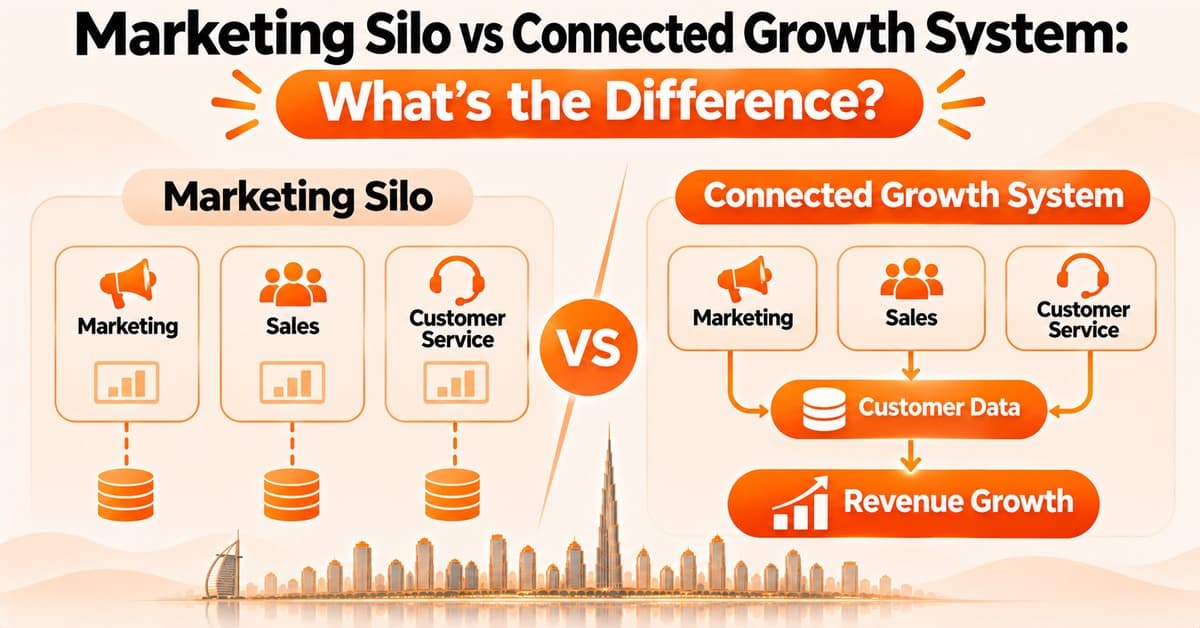

How to Connect Marketing, Sales and Customer Data

Your marketing team reports a strong number of leads. Sales says most of them are not ready to buy. Customer support knows which clients are unhappy, but that information never reaches the people planning the next campaign. Meanwhile, management is looking at three different dashboards and trying to work out which numbers are correct.
This is not just a communication problem. It is a data and process problem.
Marketing, sales and customer information become more valuable when they work together. When teams share reliable records, common definitions and a clear view of the customer journey, they can make better decisions, improve follow-up and understand which activities contribute to revenue.
Introduction
Marketing and sales alignment is often discussed as a matter of teamwork. Teams do need to communicate, but communication alone cannot solve disconnected systems, duplicate records, inconsistent lead stages or incomplete customer histories.
For B2B teams and SMEs, the practical challenge is to connect three parts of the business: marketing activity, sales pipeline information and customer data. Marketing needs to understand which campaigns attract suitable prospects. Sales needs context about each lead before making contact. Customer-facing teams need to share what happens after a deal closes so the business can improve retention and future campaigns.
A well-designed system does not require every company to buy an expensive platform or connect every application immediately. It requires clear objectives, agreed data definitions, responsible ownership and a reliable way to move information between the tools already in use.
This guide explains how to build that foundation, choose useful integrations, create shared reporting and introduce a manageable improvement process.
1. Understand What Connected Business Data Means
Connected business data means that relevant information about a prospect or customer can move between the systems and teams that need it. It gives the business a more complete view of interactions instead of leaving important details in separate spreadsheets, inboxes, advertising accounts and software platforms.
Consider a B2B company that offers website development. Marketing attracts a prospect through a search campaign. The person downloads a guide, visits a service page and submits an enquiry. Sales contacts the prospect, records the requirements, sends a proposal and updates the deal stage. After the project begins, the delivery team records onboarding details and customer feedback.
If these interactions are stored separately, each team sees only a small part of the relationship. Marketing may not know which campaign generated a profitable project. Sales may not know what the prospect already read. The delivery team may not know what was promised during the sales process.
Connected data makes these details available through agreed systems and workflows. It does not mean every employee should see every record. Access should depend on role, business need and appropriate permissions.
2. Identify Where Marketing, Sales and Customer Data Are Disconnected
Before selecting software, map the information your business already collects. The aim is to understand where data is created, where it is stored, who uses it and where it stops moving.
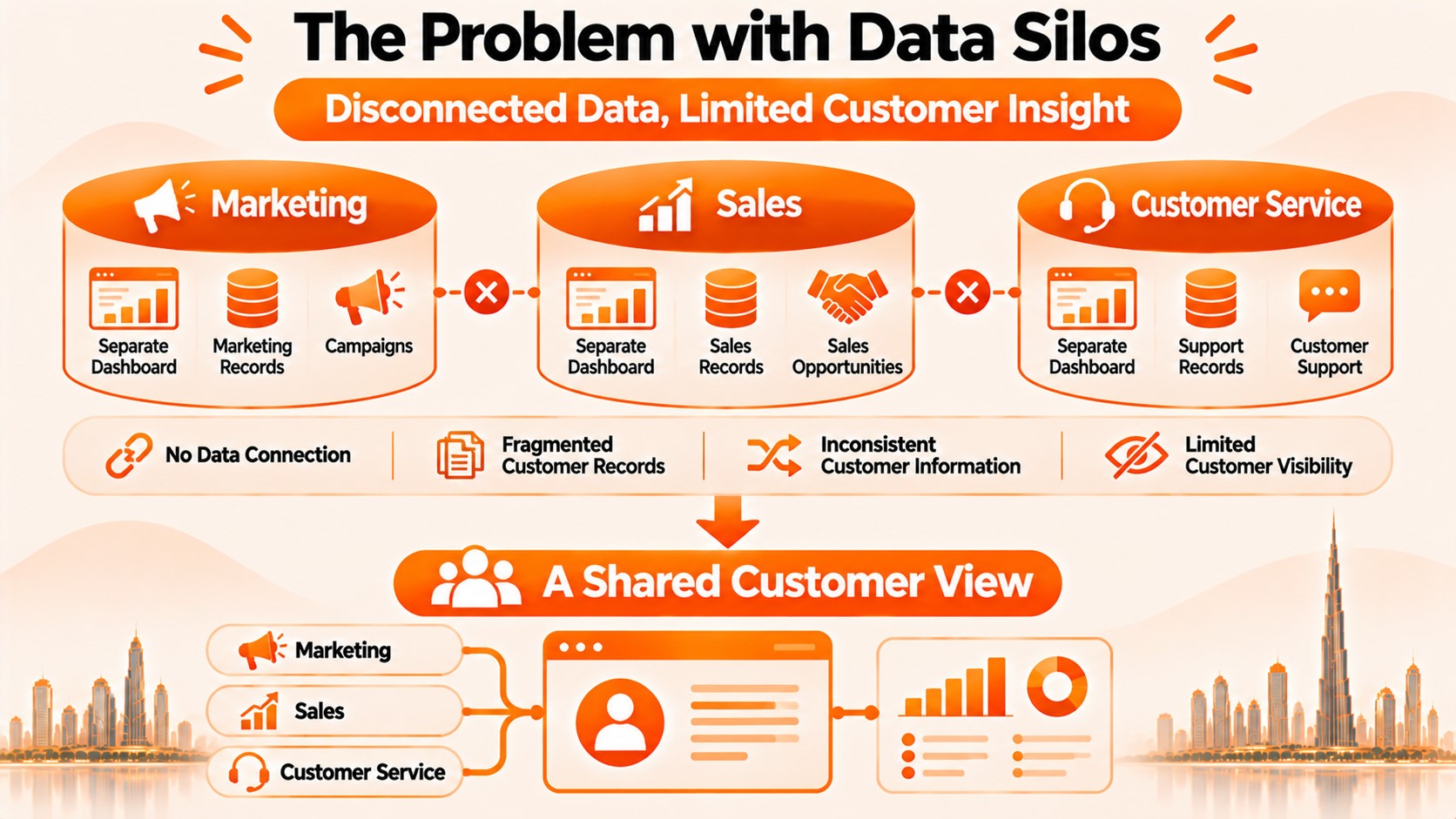
Marketing data may include campaign source, landing-page activity, form submissions, email engagement and content interactions. Sales data may include lead qualification, calls, meetings, proposals, deal value, objections and close status. Customer data may include purchases, service history, renewals, support requests, feedback and account details.
Common signs of disconnected data include:
Marketing and sales using different definitions of a qualified lead.
Sales representatives entering the same contact details into multiple tools.
Campaign sources disappearing when a lead becomes an opportunity.
Customer service feedback remaining outside the CRM.
Duplicate contacts or conflicting company records.
Management reports showing different totals for the same period.
Not every information gap requires a new integration. Sometimes the problem is inconsistent data entry, missing fields or unclear ownership. Fix the process before adding technology.
3. Agree on Shared Definitions and Customer Stages
A CRM cannot create alignment if teams use the same words to mean different things. Marketing may call someone a qualified lead because they downloaded a guide, while sales may expect evidence of budget, need and buying authority.
Create a shared customer lifecycle that reflects how your business actually sells. A simple B2B model might include new lead, marketing qualified lead, sales accepted lead, sales qualified opportunity, proposal, won customer, active customer and former customer.
Define what must happen before a record moves from one stage to another. For example, a marketing qualified lead might meet the target company profile and show meaningful buying interest. A sales qualified opportunity might require a confirmed business need, an identified decision process and a realistic next step.
Salesforce's guide to sales and marketing alignment explains why shared lead definitions, service-level agreements and feedback loops matter. The principle is straightforward: both teams should agree on what makes a lead ready and what happens after the handoff.
Document these definitions in a place both teams can access. Review them when the offer, target audience or sales process changes. This is a core part of marketing and sales alignment because shared data only becomes useful when teams interpret it consistently.
4. Make the CRM the Operational Record for Customer Relationships
A customer relationship management system, or CRM, is often the most practical place to coordinate contact, company, opportunity and customer records. It should provide the teams with a reliable operational view, but it does not automatically become the correct source for every type of data.
A CRM can hold contact details, company information, lifecycle stage, lead source, owner, deal value, sales activity and customer status. Marketing automation tools may retain detailed campaign interactions, while finance or service platforms hold invoices, subscriptions or support records.
Decide which system owns each data type. For example, the CRM may own the sales opportunity stage, while the finance system owns invoice payment status. Synchronize only the fields that have a clear purpose.
Microsoft's CRM integration guide explains how CRM connections can move customer data and workflows between business applications. It also highlights the importance of data ownership, synchronization direction, permissions and testing.
For SMEs, start with a CRM that the team will actually use. A simple, consistently maintained setup is more valuable than a complex platform filled with incomplete records.
5. Connect the Systems That Matter Most
Integration should solve a defined business problem. Connecting tools simply because connectors are available can create unnecessary complexity, extra costs and more places for data errors to occur.
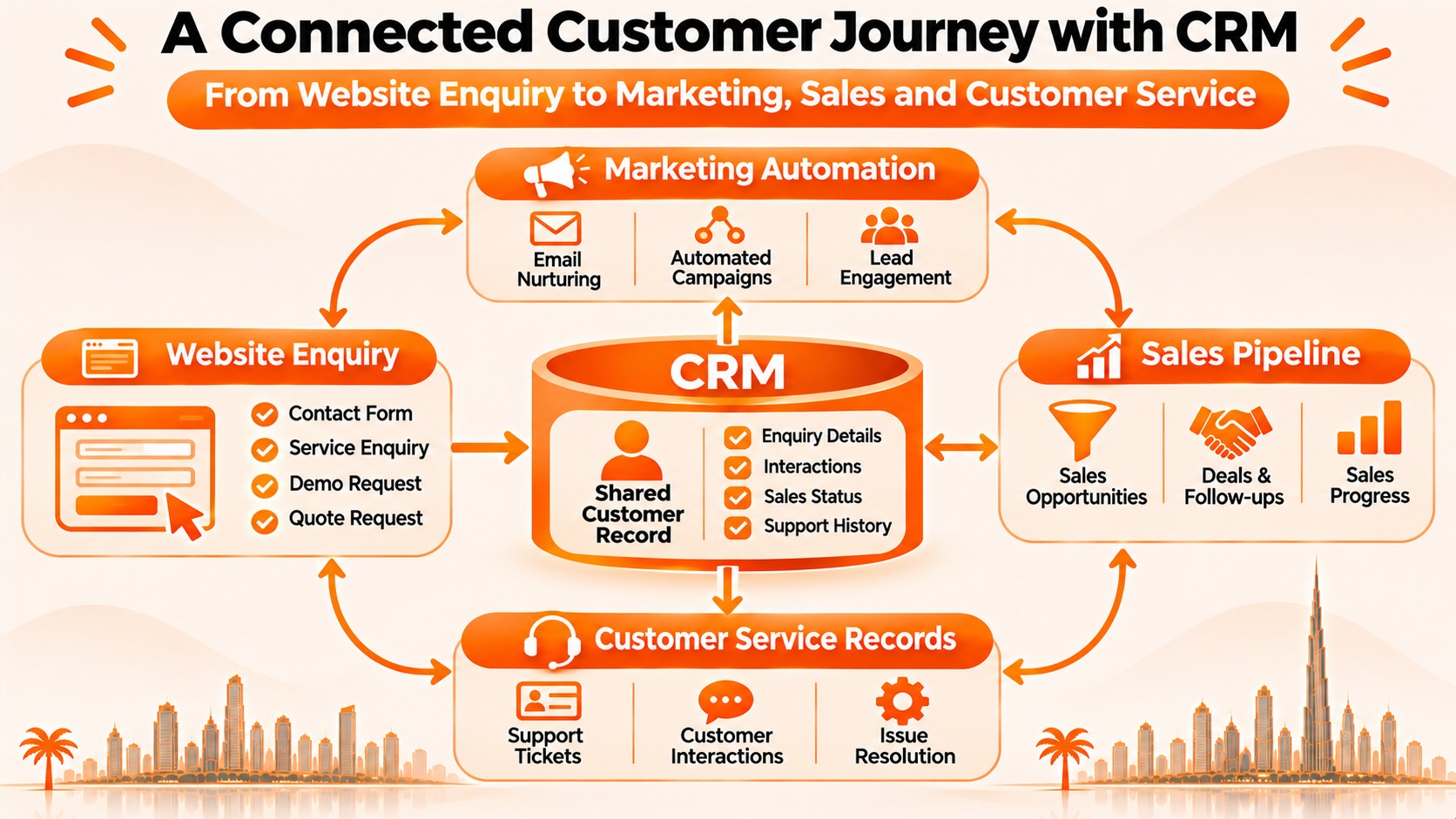
Start by identifying the systems that directly affect lead handling, customer records and revenue reporting. A typical setup may connect website forms, advertising platforms, email marketing, CRM, sales communication tools and customer support software.
For each connection, decide what information needs to move, in which direction, how often it should sync and what happens if the transfer fails. Avoid syncing every field by default. Personal information should only be collected and shared where there is a legitimate business purpose and appropriate permission.
For example, when a prospect submits a website form, the integration could create or update a CRM contact, record the campaign source, assign an owner and create a follow-up task. When the sales representative qualifies the lead, the CRM stage can update the reporting view. When the deal closes, the customer record can become available to the relevant onboarding process.
BrandVexo's AI Automation service is relevant when a business needs to reduce repetitive data entry, route enquiries or coordinate follow-up. Automation should support a well-defined process, not hide a broken one.
6. Build a Reliable Data Flow and Ownership Model
Data integration works only when teams know what information is required and who is responsible for keeping it accurate. Create a basic data dictionary that describes important fields, acceptable values, ownership and purpose.
Use a consistent format for company names, phone numbers, locations, lead sources and lifecycle stages. Define how records are matched so the same person or company is not repeatedly created. Decide how to handle missing information, outdated contacts and duplicate records.
Use this implementation sequence:
List the systems and data fields. Identify where contact, company, campaign, opportunity and customer information currently lives. Record which fields are essential for decisions or workflows.
Assign a source of truth. Choose the system that owns each important field. Avoid allowing two platforms to overwrite one another without a defined rule.
Assign data owners. Marketing operations may own campaign source definitions, sales operations may own opportunity stages, and customer service may own support status. In a small business, one person may hold several responsibilities.
Set data standards. Define required fields, naming conventions, allowed values and rules for creating or updating records.
Configure and test integrations. Test new records, existing records, duplicates, missing values and failed synchronization before rolling out the workflow.
Monitor and improve. Review data completeness, duplicate rates, integration errors and user adoption. Change the process when recurring problems appear.
Do not attempt to clean every historical record before the first improvement. Prioritize the information needed for current leads, open opportunities and active customers. Expand the cleanup as the system becomes more reliable.
7. Create Shared Reporting That Connects Activity to Revenue
Marketing and sales reports should help the business understand how activity becomes revenue. A campaign report that stops at clicks or form submissions cannot explain whether the leads became opportunities or customers.
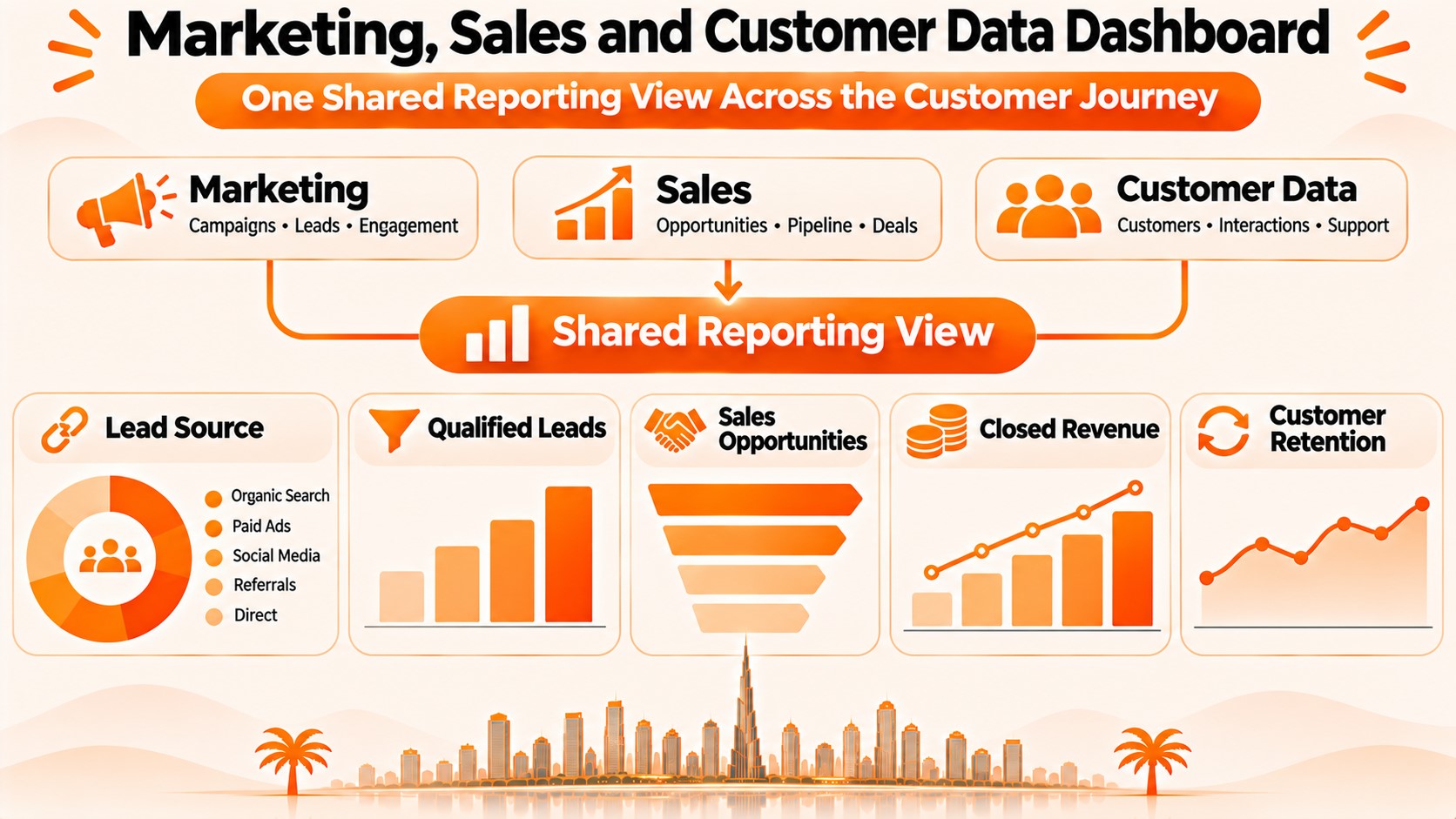
A shared dashboard should show the stages that matter to the business. Useful measures include lead volume by source, qualified lead rate, sales acceptance rate, opportunity creation, proposal win rate, sales cycle, new customer revenue and customer retention.
BrandVexo's article, Stop reporting clicks. Start reporting revenue., explains why reporting should focus on real business outcomes rather than activity alone.
Use consistent definitions and date ranges. If marketing counts a lead when a form is submitted but sales counts it only after qualification, label those stages separately. Do not combine them into one number.
Attribution also needs care. A customer may discover a company through search, return through an email, attend a webinar and later speak to sales. Last-click reporting can hide the earlier interactions. Use a consistent attribution approach and treat it as an analytical model, not perfect proof that one channel caused the sale.
8. Establish a Feedback Loop Between Teams
Connected data is not useful if nobody acts on it. Marketing needs to know which leads become real opportunities. Sales needs content that answers the objections prospects raise. Customer-facing teams need a way to share recurring questions, product issues and renewal risks.
Hold a regular review of lead quality, pipeline movement, campaign performance and customer feedback. Keep the meeting focused on decisions rather than reading dashboard numbers aloud.
A practical review should examine:
Which campaigns generated opportunities and paying customers?
Which lead sources produced poor-fit enquiries?
Why were leads rejected or opportunities lost?
Which questions or objections appear repeatedly in sales conversations?
What customer issues should influence marketing messages or onboarding?
Which data fields or workflows are incomplete?
Record actions, owners and deadlines. If sales repeatedly rejects leads for the same reason, marketing should review its targeting and qualification criteria. If customers repeatedly misunderstand a service, update the website and sales materials.
9. Protect Data Quality, Privacy and Access
A connected system can spread incorrect information faster if data quality is ignored. Duplicate contacts, outdated company details, inconsistent fields and missing consent records can undermine reporting and create poor customer experiences.
Set minimum standards for the information you collect. Capture only data that supports a defined purpose. Restrict access according to role, protect sensitive records and establish how long information should be retained. Review third-party integrations and confirm that data sharing is appropriate for the business and its legal obligations.
For companies operating in multiple jurisdictions, privacy requirements may differ depending on where customers and systems are located. Do not assume that a CRM setting alone makes the business compliant. Seek qualified advice where the applicable requirements are unclear.
10. Implement the Connection in Manageable Phases
A smaller business rarely needs a large transformation project to make progress. Begin with one customer journey, one CRM workflow and a small number of useful measures.
A sensible rollout can be organized into three phases:
First 30 days: Audit and define. Map systems, interview marketing and sales users, identify duplicate data, agree lifecycle stages and select the first workflow to improve.
Days 31–60: Connect and test. Configure the CRM fields, connect the highest-priority systems, test lead routing and build a shared dashboard for the selected journey.
Days 61–90: Review and extend. Check data quality, follow-up completion, opportunity conversion and user adoption. Fix problems before connecting additional tools or customer processes.
Choose a realistic starting point. For one SME, that may be connecting website enquiries to the CRM. For another, it may be ensuring closed-won deals are linked to campaign sources. The best first project is the one that removes a meaningful business gap without overwhelming the team.
Conclusion
Connecting marketing, sales and customer data is a practical business improvement, not simply a software project. Start by mapping where information lives, agreeing on customer stages, deciding which system owns each field and connecting only the workflows that support a clear objective. Then improve data quality, establish shared reporting and create a regular feedback loop so teams can act on what the information reveals. Strong marketing and sales alignment develops when people, processes and systems work from consistent information and share responsibility for customer outcomes.
Want to understand where your customer data and team workflows are disconnected? Request a BrandVexo audit or consultation. We can review your marketing and sales processes, data flow, CRM setup and reporting, then help identify practical improvements for a more connected growth system.
Frequently Asked Questions
1. What does marketing and sales alignment mean?
It means marketing and sales share customer definitions, goals, processes and relevant data. Both teams work toward qualified pipeline and revenue rather than optimizing separate departmental targets.
2. Why should marketing and sales share customer data?
Shared information helps sales understand where a prospect came from and what they have already engaged with. Marketing can also learn which leads become opportunities and customers, improving targeting and campaign decisions.
3. Does a small business need a CRM to connect marketing and sales?
A CRM is often useful, but the right setup depends on the business. A small company may begin with a simple CRM and a limited number of integrations. The important part is having consistent records, clear ownership and a process people follow.
4. What data should marketing and sales share?
Common fields include contact and company details, lead source, campaign interactions, lifecycle stage, qualification status, sales owner, opportunity status and customer outcome. Share only information that has a clear business purpose.
5. What is the difference between CRM integration and marketing automation?
CRM integration connects customer records and workflows across systems. Marketing automation uses software to perform or coordinate tasks such as email sequences, lead routing and campaign follow-up. They can work together, but they solve different parts of the process.
6. How can a business measure marketing and sales alignment?
Useful measures include qualified lead acceptance, MQL-to-SQL conversion, opportunity creation, lead response time, win rate, sales cycle, revenue by source and customer retention. Choose measures that reflect the actual sales process.
7. How long does it take to connect marketing, sales and customer data?
The timeline depends on the number of systems, data quality, workflow complexity and available resources. A focused first workflow may be implemented in stages over several weeks, while broader integration can take longer. Start small and test before expanding.
Free growth plan
Ready to grow your business?
Reading is a start — now let's build it. Tell us where you want to grow and a senior strategist will map the fastest, most profitable way to get there. Free, no obligation.
Discussion
Join the conversation
Be the first to comment. Comments are reviewed before they appear, so yours won't show up instantly — but we read every one.
Leave a comment